


Using the Kia Smart Power Liftgate

Cowboy Kia explain the steps involved.
The Smart Power Tailgate feature is found on all EV models and several upper trim levels of Kia crossovers and hatchbacks. Specifically for 2023 models, the feature is found on:
Model Trim
Telluride All EX and SX trim levels
Sorento All EX and SX trim levels
Sportage X-Line (opt.) All SX and X-Pro trim levels
Seltos SX
Niro Hybrid All SX Trim levels
Niro Plug-in Hybrid: SX Touring
Stinger GT2
Niro EV All
EV6 All
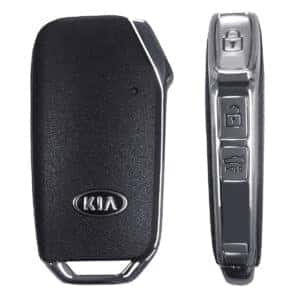
If you have one of the models above (availability may change with other model years), you may have pressed the liftgate button on your key fob and expected the liftgate to lift, and it didn’t. It isn’t broken; it just hasn’t been set yet.
While in the driver’s seat with the vehicle powered up, press the upper button on the right steering-wheel spoke that navigates your driver information screen. Press to bring up “User Settings”, then scroll down. You should see two line items:
Power Liftgate ロ
Smart Liftgate ロ
If the boxes are not checked, go ahead and check them.
Power Liftgate

With Power Liftgate checked in the User Settings, when you approach your vehicle and press the liftgate button for a full second, the liftgate will open. The liftgate height is adjustable. You may want to have it stop lower than its full height if you are short of stature or have trouble reaching up, and want to be able to access the power button on the liftgate to close it.
To have the liftgate stop before its full height, just click on the liftgate button when it reaches the desired height. Or, you can just stop it with your hand. With the liftgate at its desired height, pressing and holding the liftgate button for three seconds will program the liftgate to always rise at this height. Press and release the liftgate button on the key fob or on the liftgate itself to close it.
Smart Liftgate
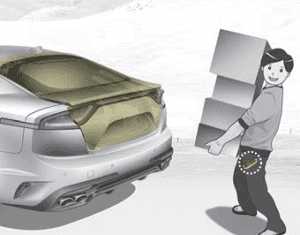
With Smart Liftgate checked on your User Settings, you won’t even have to reach for the key fob to activate the liftgate. This is useful in a number of scenarios, such as walking to the vehicle with both hands full of the items you want to load inside. Or if you find yourself busy with children or pets, or even if one hand is disabled and the other occupied. Smart Liftgate is on standby automatically after all the doors have been locked for 15 seconds. After such a time, for instance, when you are returning from a store with the key fob remaining in your pocket or purse, simply stand between 20 and 40 inches behind the liftgate, and after three seconds, you will hear a chime, the amber lights will flash, and the liftgate will open. That’s all. There is no kicking the underside of the bumper or waving a foot under it as on other brands, neither of which may seem like a good idea on a slick surface. Just stand there, and it opens. If you anticipate standing behind the vehicle and not wanting the liftgate to open, such as when washing the car or applying a bumper sticker, simply press and release the liftgate button as you approach the vehicle, and the Smart Liftgate feature will be disabled until you press the liftgate button again.
If you open the liftgate using the Smart Liftgate feature, all the doors will remain locked after you close it. If you open the liftgate using the key fob and plan to leave the vehicle, make sure you lock all the doors using the key fob’s lock button.
This description makes it sound more complicated than it is. Once you have your User Settings as you want them, it’s just pushing a button to open or just standing there to open, and it will soon become second nature. If you have any questions or if something doesn’t seem to behave as it should, please don’t hesitate to ask any of the Cowboy Kia sales or service professionals for assistance.

0 comment(s) so far on Using the Kia Smart Power Liftgate